
AC Fan On or Auto: Which Setting Is Best for Energy Efficiency and Comfort?

by Tyler Castle
Updated: August 17, 2026
18.8 min read
Key Points of This Article:
- For most homes, setting the AC fan to Auto is the most energy‑efficient choice, because the fan only runs during active cooling cycles, reducing electricity use and improving humidity control.
- The On setting keeps air circulating continuously, which can improve comfort and even out temperatures in some homes, but it increases electricity usage.
- The best fan setting depends on your comfort needs, but Auto is usually recommended as the default for everyday cooling, while On works best as a temporary solution for airflow or hot‑spot problems.
Have you ever fiddled around with your air conditioning settings and wondered which was the most efficient? Two of the most common settings on your home air conditioner are "On" and "Auto" and many homeowners often wonder what's the difference and how can it help me save.
As an energy supplier for more than 35 years, we've helped Midwest homeowners understand everyday energy decisions such as thermostat settings, cooling habits, and how small changes can affect comfort and electricity use. These small choices can make a noticeable difference during long, humid summers.
It may seem like a small setting, but that choice can affect how comfortable your home feels, how well humidity is controlled, and how much electricity your cooling system uses and we're here to help you debunk the difference and determine which setting is right for you.
AC Fan On or Auto: Which Setting Is Best for Energy Efficiency and Comfort?
For most homes, the U.S. Department of Energy notes that for optimal efficiency, central air systems should usually have the fan set to Auto, which allows the fan to run only when cooling is needed.
But the On setting may feel better when one room stays warmer than the others, if your house feels stuffy between cooling cycles, or you want steadier airflow throughout the home.
Some homeowners still prefer the On setting because it keeps air circulating continuously. That steady airflow can make temperatures feel more even between rooms and reduce the feeling of still air in the house.
However, constant fan operation also means the blower runs all the time, which increases electricity use and can make humidity harder to control during summer.
When the fan is set to Auto, it turns on during cooling and shuts off once the thermostat reaches the set temperature. This prevents the system from using extra electricity just to keep air moving when cooling is not needed.
If you're asking yourself: Should my AC fan be on auto or On, if your goal is lower energy use and better moisture control, Auto is usually the better everyday choice, while On can be useful in specific comfort situations like if you're occupying a single room.
How the AC Fan "Auto" Setting Works and Why It Often Saves Energy
The AC fan's Auto setting works by turning the fan on only when your air conditioner is actively cooling, and it often saves more money and energy because the fan shuts off when the cooling cycle ends instead of running all the time.
In everyday use, that means your system cools the house, moves that cooled air through the ducts, and then both the cooling and the fan stop once the thermostat reaches the set temperature. This is one reason Auto is commonly recommended for homeowners who want a simple, efficient default setting.
Another reason Auto is often the better choice is humidity control. During a cooling cycle, your AC removes moisture from indoor air. When the fan is set to Auto, it stops after cooling so that moisture can drain away instead of being pushed back through the house.
How the AC Fan "On" Setting Works and When It Can Improve Comfort
The AC fan's On setting keeps the indoor fan running continuously, and it can improve comfort by keeping air moving more steadily through your home, even when the air conditioner is not actively cooling.
In everyday terms, that constant airflow can help a home feel less stuffy and may make temperatures feel a little more even from room to room. This can be helpful in homes where one bedroom stays warmer than the rest of the house, in multi-story homes, or when you want air to keep moving through your filter between cooling cycles.
The tradeoff is that the fan also uses electricity the entire time it is running. It is usually less helpful during humid Midwest summers, because running the fan continuously can push moisture back into the air and make the home feel more damp or sticky.
So, the On setting can be helpful when you want steadier airflow, but it is usually better used for a specific comfort reason rather than as the default everyday setting.
What's the Difference Between AC Fan Auto and On Settings?
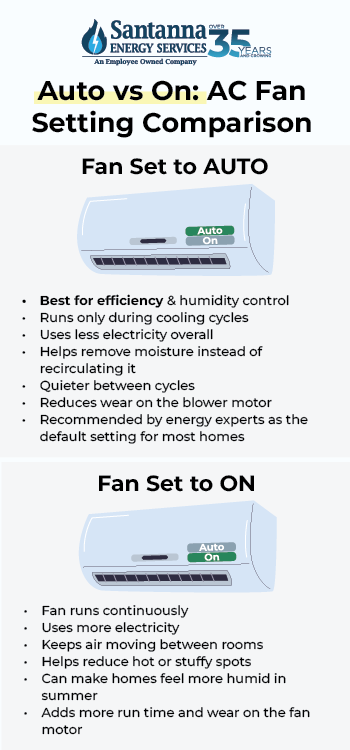
The main difference between AC fan Auto and On is when the fan runs. Auto runs the fan only when your air conditioner is actively cooling, while On keeps the fan running continuously, even between cooling cycles.
That one difference can affect energy use, airflow, humidity, and overall comfort in your home. For many homeowners, the choice comes down to whether they want better efficiency or more constant air movement.
To make that easier to compare, see the chart below for a full breakdown of how Auto and On differ in everyday use.
AC Fan On vs Auto: Key Differences in Electricity Use, Airflow, Humidity, and Comfort
| Feature | Fan Auto | Fan On |
| When the fan runs | Only during cooling cycles | Runs continuously |
| Electricity use | Lower | Higher |
| Air circulation | Air moves only while cooling | Air moves all the time |
| Humidity control | Usually better | Can make humidity harder to control |
| Noise level | Usually quieter | More constant fan noise |
| System wear | Less wear on the fan motor | More wear on the fan motor |
| Best for | Saving energy and managing humidity | Keeping air moving more consistently |
Pros of Leaving Your AC Fan Set to On
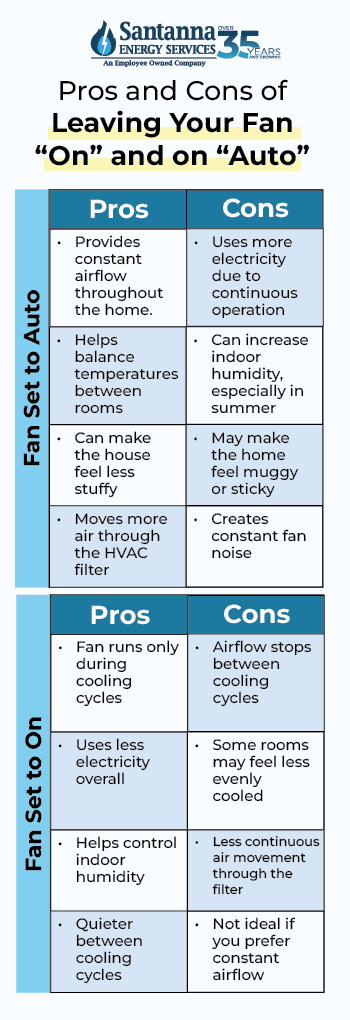
Leaving your AC fan set to On keeps air circulating throughout your home all the time and comes with many other benefits. Here are some benefits homeowners may notice when using the On setting:
- Provides constant airflow: Air continues moving through the home even when the air conditioner is not actively cooling.
- Helps balance temperatures between rooms: Continuous airflow can help mix air throughout the house, which may reduce hot or cool spots.
- Can make the house feel less stuffy: Constant air movement can help rooms feel fresher and less stagnant.
- Moves more air through the filter: Since air is always circulating through the HVAC system, the filter may capture more airborne particles over time.
- Creates steadier airflow: Some homeowners prefer the feeling of continuous air movement instead of the stop-and-start airflow that happens during normal cooling cycles.
- Helpful if your thermostat does not have a Circulate setting: If your system does not offer a middle-ground option for periodic airflow, leaving the fan on can be a simple way to keep air moving.
Cons of Leaving Your AC Fan Set to On
Although the On setting can improve airflow, it also comes with tradeoffs. Because the fan runs continuously, it uses electricity even when the air conditioner is not cooling the home.
Here are some of the most common drawbacks of leaving the AC fan set to On.
- This setting uses more electricity: Because the blower fan runs continuously, it keeps using power even when the AC is not actively cooling.
- Can increase indoor humidity in humid climates: When the fan keeps running after a cooling cycle ends, it can move moisture back into the air instead of allowing it to drain away.
- May make the home feel muggy: In humid regions like the Midwest during summer, continuous fan operation can sometimes make the house feel more damp or sticky.
- Creates constant fan noise: Since the fan never shuts off, you may hear ongoing airflow or background noise from vents throughout the day.
- Adds more run time to the blower motor: Running the fan all day means the blower operates many more hours than it would on Auto.
- Not always the most efficient way to improve airflow: Sometimes, simple solutions like ceiling fans or portable fans can improve comfort without running the central HVAC fan all day.
Pros of Setting Your AC Fan to Auto
Setting your AC fan to Auto is usually the most efficient choice for everyday cooling. In this mode, the fan runs only when the air conditioner is actively cooling your home and shuts off when the cooling cycle ends.
Here are some of the main advantages of using the Auto setting.
- This setting uses less electricity: The fan only runs when the air conditioner is actively cooling. When the home reaches the set temperature, the fan shuts off too, which avoids using electricity when airflow is not needed.
- Helps control indoor humidity: During cooling cycles, your AC removes moisture from the air. When the fan shuts off after cooling, that moisture can drain away instead of being pushed back into the house.
- Works well in humid summer weather: In many homes, especially during humid Midwest summers, the Auto setting helps maintain a more comfortable indoor environment because the system focuses on cooling and removing moisture at the same time.
- Quieter between cooling cycles: Because the fan turns off when cooling stops, you do not hear constant airflow or fan noise throughout the day.
- Reduces unnecessary fan run time: The blower only operates when it is needed for cooling, which means fewer total hours of operation compared with running the fan continuously.
- Often a better default setting: If your home already cools evenly and you are not trying to solve a specific airflow issue, Auto is usually the simplest and most efficient everyday choice.
Cons of Setting Your AC Fan to Auto
While the Auto setting works well for most homes, it does have a few limitations. Because the fan stops running when the cooling cycle ends, airflow through the house also stops between cycles.
Here are some situations where the Auto setting may feel less ideal.
- Air only moves during cooling cycles: When the system is not actively cooling, the fan shuts off. This can make some rooms feel still or slightly stuffy between cycles.
- Rooms may feel less evenly cooled: In homes with multiple floors, long duct runs, or rooms far from the HVAC system, airflow may not continue mixing after the cooling cycle ends.
- Less air passes through the filter: Because the fan runs only during cooling, less air moves through the filter throughout the day compared with continuous fan operation.
- May not feel comfortable if you prefer constant airflow: Some homeowners simply like the feeling of air moving through the home more often, which Auto does not provide.
- Less continuous air mixing: Air circulation slows down when the fan shuts off, which can allow temperature differences between rooms to become more noticeable.
- Less airflow during mild weather: When outdoor temperatures are not very hot, cooling cycles may be shorter and less frequent, which means the fan may run less overall.
What Factors Affect AC Fan Efficiency and Comfort in Your Home?
Several factors influence how efficiently your AC fan works and how comfortable your home feels. The fan setting itself is important, but it is only one part of the overall system. Here are some of the key factors that can influence how your AC fan performs and how comfortable your home feels during cooling season:
Indoor Humidity
Humidity affects how cool or sticky your home feels. Even if the thermostat says the temperature is fine, high humidity can make the house feel warmer than it really is. In many homes, the Auto setting helps more with comfort because it allows your system to remove moisture during cooling cycles without constantly pushing damp air back through the house.
Air Filter Condition
A dirty air filter can reduce airflow and make your system work harder. When air cannot move easily, some rooms may feel less comfortable and the cooling system may run longer than necessary. Keeping the filter clean helps air move more freely and supports both comfort and efficiency.
Ductwork
Your ducts carry cooled air from the system to different rooms. If they are leaky, loose, or poorly sealed, some of that cooled air can escape before it reaches the spaces you want to cool. That can lead to uneven temperatures and wasted energy.
Insulation and Air Leaks
Insulation and air sealing affect how well your home holds onto cooled air. If warm outdoor air keeps getting inside through gaps, cracks, or poorly insulated areas, your AC system has to work harder to keep the home comfortable. That extra strain can affect both energy use and indoor comfort.
AC System Size
The size of your AC system also matters. If the system is too large, it may cool the house too quickly and shut off before it removes enough moisture from the air. If it is too small, it may run longer and still struggle to keep up. Either way, comfort and efficiency can suffer.
If your home feels uneven, humid, or expensive to cool, the fan setting may be part of the reason, but it is usually not the only one. Looking at the full picture can help you better understand what is affecting comfort and energy use in your home.
Does "Fan Mode" on an AC Save Electricity?
Fan mode on an AC usually uses less energy than active cooling, but it still uses more electricity than the "Auto" setting because the blower fan continues running even when the system is not cooling.
In fan mode, the air conditioner circulates indoor air through the ductwork without turning on the compressor that actually removes heat from the home. Because the compressor is the most energy-intensive part of the system, running the fan alone typically uses much less energy than running the full cooling cycle.
For example, if a central AC blower fan uses about 500 watts, running it in fan mode for 8 hours would use about 4 kilowatt-hours of electricity. Running the same fan for 24 hours would use about 12 kilowatt-hours. By comparison, full AC cooling typically uses much more electricity because both the compressor and the fan are operating.
So, while fan mode uses less energy than cooling, it can still increase your total electricity use if it runs for long periods. For most homes, fan mode works best as a short-term airflow option, while Auto remains the more efficient everyday setting.
Does Leaving the AC Fan on Waste Electricity?
Leaving the AC fan on all the time can waste electricity because the blower continues running even when your home does not need cooling.
When the fan is set to On, it keeps circulating air between cooling cycles instead of shutting off once the thermostat reaches the desired temperature. This means the system continues using electricity simply to move air through the ducts.
For example, a blower fan that uses 500 watts would consume about 12 kilowatt-hours of electricity in 24 hours if it runs continuously. If the same fan ran only during cooling cycles for about 8 hours, it would use roughly 4 kilowatt-hours instead.
That difference equals about 8 extra kilowatt-hours in a single day, or about 240 additional kilowatt-hours over a 30-day month.
If the constant airflow is not solving a comfort problem such as uneven temperatures or stale air, that extra energy use usually provides little benefit. This is why many energy experts recommend Auto as the default fan setting for most homes.
How Much More Electricity Does AC Fan "On" Use Than "Auto"?
Leaving your AC fan set to On can use significantly more electricity than Auto because the blower operates continuously instead of only during cooling cycles.
Using the same example of a 500-watt blower fan, running the fan on Auto would cycle on for about 8 hours of cooling time per day and use about 4 kilowatt-hours of electricity. If the fan runs on "On" for the full 24 hours, it would use about 12 kilowatt-hours.
That means the On setting uses about 8 additional kilowatt-hours per day compared with Auto.
Over a 30-day month, that difference can add up to roughly 240 extra kilowatt-hours of electricity simply from the fan running continuously.
Actual numbers vary depending on the fan motor, thermostat settings, and cooling demand in your home. But the overall pattern remains the same: Auto uses less electricity because the fan operates only when cooling is needed.
AC Fan Circulate vs Auto: Key Differences in Energy Efficiency
| Fan Setting | Daily Run Time | Daily Energy Use | Weekly Energy Use | Monthly Energy Use | Yearly Energy Use |
| Auto | 8 hours | 4 kWh | 28 kWh | 120 kWh | 1,460 kWh |
| On | 24 hours | 12 kWh | 84 kWh | 360 kWh | 4,380 kWh |
| Difference | — | 8 extra kWh | 56 extra kWh | 240 extra kWh | 2,920 extra kWh |
Running your AC fan on Auto instead of On can reduce fan-related electricity use by about 56 kWh per week, 240 kWh per month, or 2,920 kWh per year in this example, simply because the fan runs only during cooling cycles instead of all day.
How Much More Does AC Fan "On" Cost to Run Than "Auto"?
Leaving your AC fan set to On instead of Auto could add about $41 more per month in electricity costs in a typical example, because the blower runs continuously instead of only during cooling cycles.
To understand why, consider a simple example using a 500-watt blower fan. If the fan runs on Auto, it cycles on for about 8 hours per day during normal cooling cycles and will use about 120 kilowatt-hours in a 30-day month. If the fan runs continuously on the On setting, it would use about 360 kilowatt-hours per month.
That means the On setting could use about 240 more kilowatt-hours each month than Auto simply from running the fan longer.
To estimate the cost difference, we can apply the U.S. average residential electricity price of 17.24 cents per kilowatt-hour for December 2025, reported by the U.S. Energy Information Administration.
At that rate:
- 120 kWh (Auto) = $20.69 per month
- 360 kWh (On) = $62.06 per month
In this example, leaving the fan running continuously could add about $41.38 more per month, or over $500 per year, just from the fan operating all day.
Actual costs will vary depending on your fan motor, cooling usage, and electricity rate. But the takeaway is simple: Auto usually costs less because the fan runs only when cooling is needed.
The table below shows how this difference in fan run time translates into estimated electricity costs.
Estimated Cost Difference: AC Fan On vs Auto
| Fan Setting | Energy Use per Day | Daily Cost | Monthly Cost | Yearly Cost |
| Auto | 4 kWh | $0.69 | $20.69 | $251.70 |
| On | 12 kWh | $2.07 | $62.06 | $755.11 |
| Difference | 8 kWh more | $1.38 more | $41.37 more | $503.41 more |
Because the fan runs every day, even small differences in daily energy use can become noticeable on your electricity bill over a full cooling season.
AC Fan Circulate vs Auto: Which Setting Uses Less Energy?
The Auto setting usually uses less energy than the Circulate setting because Auto runs the fan only when the air conditioner is actively cooling your home.
When your thermostat is set to Auto, the fan turns on during cooling cycles and shuts off once the desired temperature is reached. This limits how long the blower runs and helps reduce electricity use.
The Circulate setting works differently. Instead of waiting for cooling cycles, it turns the fan on periodically throughout the hour to keep air moving through the home. This can help mix air between rooms and reduce the feeling of stale or uneven airflow.
Because the fan runs more often in Circulate mode, it typically uses more electricity than Auto, but it still uses less energy than leaving the fan set to On, which keeps the fan running continuously.
For many homeowners, Circulate can be a middle-ground option when they want better airflow without the full energy use of running the fan all day.
The table below shows a simple comparison of how the Auto and Circulate settings affect fan operation and energy use.
AC Fan Circulate vs Auto: Key Differences
| Fan Setting | How the Fan Runs | Energy Use | Best For |
| Auto | Runs only during cooling cycles | Lower | Saving energy and managing humidity |
| Circulate | Runs periodically throughout the hour to mix air | Slightly higher | Improving airflow and balancing temperatures |
Auto usually uses less electricity because the fan runs only when cooling is needed. Circulate can help improve airflow between rooms, but it uses a bit more energy since the fan turns on periodically throughout the hour.
FAQs
Does Running the AC Fan All the Time Wear Out the System Faster?
Yes, running the AC fan continuously can increase wear on the blower motor because it operates many more hours than when it runs only during cooling cycles.
Does Running the AC Fan on "On" Help Cool the House Faster?
No, running only the fan does not cool the house faster because the fan circulates air, while the cooling coils and compressor are the parts that actually remove heat and cool the air.
Can my AC Fan Run Without the Air Conditioner?
Yes, the fan can run without cooling because its job is simply to circulate air through the ducts, even when the air conditioner is not actively removing heat.
Can Running the AC Fan Improve Air Quality?
Yes, running the fan can improve air quality somewhat by moving more air through your HVAC filter, but EPA says filtration is only a supplement and does not remove all pollutants by itself.
Choosing the right AC fan setting comes down to how you want your home to balance comfort, airflow, and energy use. For most homes, the Auto setting is the better everyday option because it runs the fan only during cooling cycles, which helps reduce electricity use and manage humidity more effectively.
This can matter even more during humid Midwest summers, when cooling systems already run more often and small thermostat choices can quietly affect how much electricity your home uses over time.
Once you've improved how your AC runs, it can also help to think about long-term stability on the supply side of your bill. Santanna's Unlimited Energy plan is one option to explore if you want a predictable supply charge, fewer surprises during high-usage months*, and easier budgeting from season to season.
* Restrictions apply. Enrollment based upon program eligibility. Customers using more than 125% of normal monthly usage as determined by Santanna may be required to switch plans.
Tyler is an experienced energy professional, having worked for Santanna Energy Services, for the past four years. He is passionate about renewable energy and believes that diversifying the energy grid is the key to a sustainable future. Tyler is dedicated to supplying consumers with the best possible energy solutions and works diligently to make sure that Santanna can deliver the highest quality service.