
What Does ‘Hold’ Mean on a Thermostat?

by Tyler Castle
Updated: August 17, 2026
10.4 min read
Key Points of This Article:
- “Hold” on a thermostat means it pauses your programmed schedule and keeps your home at a fixed temperature until you change it.
- “Hold” can be useful for temporary situations like staying home unexpectedly or wanting consistent comfort for a period of time. However, leaving it on too long can increase energy use because your system runs more to maintain one constant temperature.
- Switching back to “Run” mode restores your schedule, which often helps reduce energy costs by adjusting temperatures automatically.
You adjust your thermostat and suddenly it says "HOLD". Now you're probably wondering what just happened.
Is this permanent? Did I override something? Why isn't my schedule changing anymore? Well, we're here to debunk that for you.
In this guide, we will walk you through what "Hold" really means on a thermostat, why it shows up, when it is helpful to use, and when it might be increasing your energy bill so you can feel more confident in how your home is running day to day and how your settings connect to your overall energy costs.
What Does "Hold" on a Thermostat Mean?
"Hold" on a thermostat means your thermostat stops following its programmed schedule and keeps your home at the temperature you set until you cancel the command.
In the "Hold" setting, your thermostat stays at one constant temperature set by you instead of making automatic adjustments throughout the day.
The main thing to know is that "Hold" does not shut your system off and it does not erase your schedule; it simply puts the schedule on pause, so your home can stay at one temperature until told otherwise.
Keep in mind that the meaning of a "hold" can vary depending on the thermostat model. Other models might refer to a 'hold' as a 'temporary hold' where the hold lasts until the next scheduled change, and a 'permanent hold' that overrides the schedule indefinitely. Check your thermostat's manual for exact 'hold' functionality.
What Does Permanent Hold Mean on a Honeywell Thermostat?
According to Honeywell Home, the “Permanent Hold” setting on a thermostat maintains the temperature you choose until you manually change it or return to its schedule. In other words, it overrides the scheduled temperature changes that would normally happen throughout the day.
This can be useful when you want a steady temperature for an extended period, but it also means your thermostat will not go back to its normal routine on its own. If you want the programmed schedule to start working again, you will need to manually press “Run”, “Run Schedule”, or a similar button depending on your model to resume your continued schedule.
When Should You Use “Hold” on Your Thermostat (And When Should You Avoid It)?
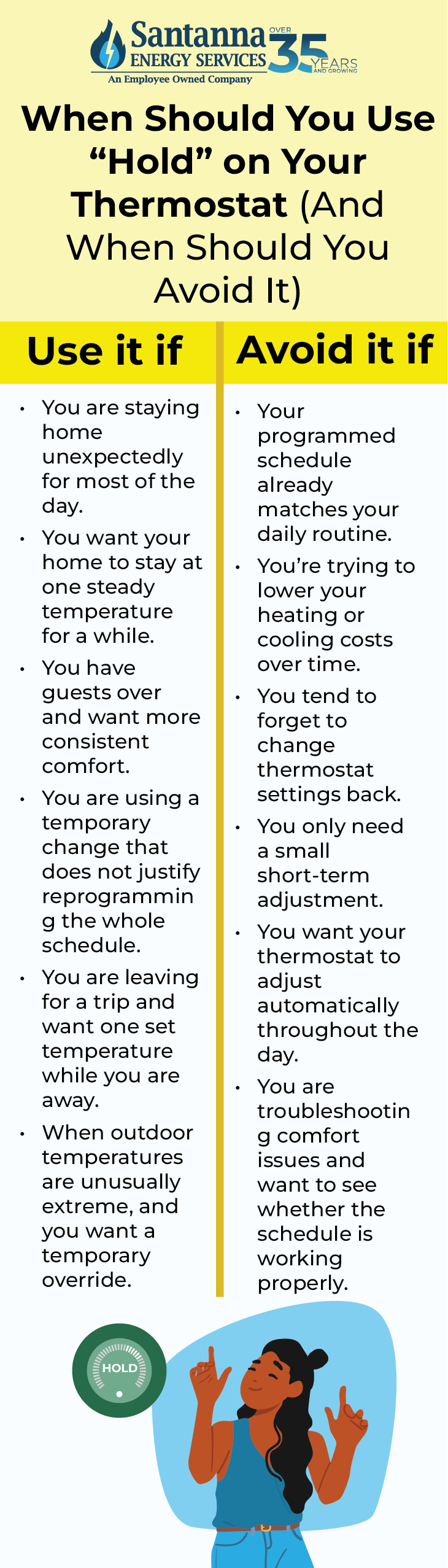
You should use “Hold” on your thermostat when you want your thermostat to keep one steady temperature for a specific reason, and you should avoid it when your normal schedule already does a better job of balancing comfort and energy use.
“Hold” works best when you make a clear, intentional choice based on what is happening in your home that day, such as staying home unexpectedly, having guests over, or wanting to keep the temperature steady for a few hours.
We recommend you use the “Hold” setting when:
- You are staying home unexpectedly for most of the day: If your usual schedule is set to save energy while the house is empty, “Hold” can help keep the home comfortable when you end up staying in. This is useful on sick days, snow days, or work-from-home days when your normal routine changes.
- You want your home to stay at one steady temperature for a while: Sometimes you may want consistent comfort without the thermostat changing settings in the background every few hours. The “Hold” setting can help when you want the temperature to stay the same for several hours instead of moving through scheduled changes.
- You have guests over and want more consistent comfort: If people are visiting and the house feels too warm or too cool, “Hold” can help you keep the temperature where it feels comfortable without waiting for the next scheduled change.
- You are using a temporary change that does not justify reprogramming the whole schedule: “Hold” is helpful when you need a short-term adjustment but do not want to rewrite your weekday or weekend settings just for one unusual day.
- You are leaving for a trip and want one set temperature while you are away: Some homeowners use “Hold” before leaving town so the house stays at a steady setback temperature until they return. This can be simpler than adjusting multiple schedule periods for a short trip.
- When outdoor temperatures are unusually extreme, and you want a temporary override: During a very cold winter day or a hot summer stretch, you may decide you want a slightly different setting than what your usual schedule provides. “Hold” can help you manage comfort during those unusual conditions.
You may want to avoid the “Hold” setting on your thermostat when:
- Your programmed schedule already matches your daily routine: If your thermostat is already set up around when you wake up, leave, come home, and go to bed, using “Hold” may remove the benefits of those planned adjustments (such as energy savings) without giving you much in return.
- You’re trying to lower your heating or cooling costs over time: A good schedule usually helps reduce unnecessary system run time. If the “Hold” setting keeps your home at one comfortable temperature all day, your heating or cooling system may run more than needed.
- You tend to forget to change thermostat settings back: “Hold” can stay on longer than you intended, especially if it is set as a permanent hold. If you forget to turn it off, your thermostat may stop following the schedule for days.
- You only need a small short-term adjustment: In some homes, making a small change and letting the thermostat return to schedule on its own may work better than placing the system on “Hold” for a longer period.
- You want your thermostat to adjust automatically throughout the day: If your goal is to let the system respond to your normal routine, the “Hold” setting works against that. It pauses those automatic changes and keeps one temperature in place instead.
- You are troubleshooting comfort issues and want to see whether the schedule is working properly: If you are trying to figure out whether your schedule is set correctly, leaving Hold on can make it harder to tell what the thermostat is actually supposed to do.
How Do You Turn Off “Hold” on a Thermostat?
You can turn off the “Hold” setting on a thermostat by selecting the option that returns it to its programmed schedule, usually labeled “Run,” “Resume,” or “Cancel Hold.”
Most thermostats follow a similar process, even though the buttons or screen may look slightly different. Here are the general steps:
- Look for a “Run,” “Resume,” or “Cancel Hold” button: These options tell the thermostat to exit Hold mode and go back to its schedule.
- Press the button to restore the schedule: Once selected, the thermostat will stop maintaining one fixed temperature and begin following your programmed time-based settings again.
- Confirm that “Hold” is no longer displayed: Check the screen to make sure the word “Hold” has disappeared. This means the schedule is active again.
- Check your upcoming schedule settings if needed: If the temperature changes right away, it is likely following the next scheduled time period. You can review your schedule to make sure it matches your routine.
How Long Does “Hold” Last on a Thermostat?
How long the “Hold” setting on your thermostat lasts depends on whether it is set as a temporary or permanent hold and on the type of thermostat you have.
A temporary hold lasts only until the next scheduled time period (usually 24 hours). After that, your thermostat automatically returns to its programmed schedule without you needing to do anything. For example, if you change the temperature in the afternoon, the hold may last until your evening setting begins.
A permanent hold lasts until you manually turn it off. The thermostat will continue maintaining the same temperature and will not return to its schedule unless you press “Run,” “Resume,” or a similar option.
The exact behavior can vary depending on your thermostat model, but the important thing to know is that “Hold” does not stay on forever unless it is set to permanent. If your thermostat is on a temporary hold, it will return to its normal schedule on its own at the next programmed time.
Hold vs Run on a Thermostat: Which Uses More Energy in Your Home?
In most homes, “Run” mode on a thermostat can use less energy because it allows temperature setbacks during times when you do not need as much heating or cooling, such as when you are asleep or away.
According to the U.S. Department of Energy, adjusting your thermostat for about 8 hours a day can reduce heating and cooling costs by up to 10% per year. This is why using a schedule in Run mode can often use less energy than keeping your thermostat on “Hold” setting at one constant temperature all day.
Hold vs Run on a Thermostat: Energy Use and Behavior Compared
| Mode | What It Does | Energy Impact in Real Use |
| Hold | Keeps one constant temperature | Can use more energy if the system runs continuously to maintain comfort all day |
| Run | Follows programmed schedule | Often uses less energy by adjusting temperatures when you are asleep or away |
When your thermostat is on “Hold” mode, your system works to maintain the same temperature until the hold ends, or you turn it off. If that temperature is set for comfort all day, your heating or cooling system may run longer than necessary, especially when no one is home or during overnight hours.
When your thermostat is on “Run” mode, it follows the schedule you set. That means it can automatically lower or raise the temperature during times when full heating or cooling is not needed.
Does Using “Hold” on a Thermostat Save Energy or Increase Your Bill?
Using Hold on a thermostat can either save energy or increase your bill depending on how you use it, but in many homes, it increases energy use.
When your thermostat is on “Hold”, it maintains one constant temperature instead of adjusting throughout the day. If that temperature is set for comfort and stays the same while you are asleep or away, your heating or cooling system may run longer than necessary.
Using the “Hold” setting on your thermostat could raise your electricity bill by as much as $1.03 a day.
Here’s how this plays out: If you keep your thermostat on “Hold” at 72°F while you are away for about 8 hours, your system may use around 30 kWh in a day. At an average rate of 17.24 cents per kWh based on December 2025 data from the U.S. Energy Information Administration, that would cost about $5.17 for the day. If you instead use a schedule that adjusts the temperature during those 8 hours, your system might use closer to 24 kWh. At the same rate, that comes out to about $4.14 for the day.
That difference of about 6 kWh per day adds up to roughly $1.03 daily, or around $30 per month depending on your usage. While exact numbers will vary by home, weather, and system efficiency, the pattern is consistent.
The “Hold” setting on a thermostat may seem like a small setting, but it plays a big role in how your home feels and how much energy your system uses. When used intentionally, it can help with comfort, but if left on longer than planned, it can lead to higher energy use and unexpected changes in your home.
Once your thermostat is working the way you expect, you gain more control over how your home uses energy day to day.
That is where looking beyond your thermostat can make a difference. While “Hold” helps you manage your home’s temperature, your energy costs can still change with the seasons. A plan with more predictable supply charges, like Santanna’s Unlimited Energy plan, can help make your monthly costs easier to manage during high-usage months.* Find out more, now!
* Restrictions apply. Enrollment based upon program eligibility. Customers using more than 125% of normal monthly usage as determined by Santanna may be required to switch plans.
Tyler is an experienced energy professional, having worked for Santanna Energy Services, for the past four years. He is passionate about renewable energy and believes that diversifying the energy grid is the key to a sustainable future. Tyler is dedicated to supplying consumers with the best possible energy solutions and works diligently to make sure that Santanna can deliver the highest quality service.